REDCap User Onboarding: Frequently Asked Questions
Why am I unable to initiate visitor agreements in CenCom Admin?
If you visit the CenCom Admin Visitor Agreements page and do not see the "Start New" and "Check Progress" sections at the bottom of the screen (as shown in the image below), this means you are not currently listed as a supervisor or delegate in CenCom Admin.
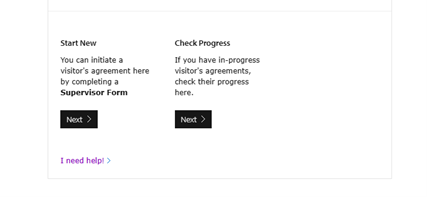
If you believe you should be listed as a supervisor, please contact us at helpdesk@camide.cam.ac.uk. If you need to act on a supervisor’s behalf, please ask the relevant Chief Investigator to email the helpdesk requesting that you be added as their delegate.
Can I request access to multiple databases with a single DVA?
Yes, if the University of Cambrige supervisor (i.e. the chief investigator) is the same for all projects covered by the DVA. Please enter the details of one study using the form and add the details of any additional projects in the comments box.
If the visitor is working on more than one study with different chief investigators, separate DVAs must be submitted.
How long does the onboarding process take?
Timelines vary depending on the type of user and the platform(s) they require access to. The estimates below assume all forms are completed and returned promptly (i.e., within one working day):
- REDCap Anonymised – external users: 3–4 working days
- REDCap Anonymised – internal users: 2–3 working days
- REDCap Safe Haven – external users: 4–5 working days
- REDCap Safe Haven – internal users: 3–4 working days
If forms are delayed or incomplete, onboarding can take significantly longer. While we will contact you if any required information is missing, we do not routinely follow up on unreturned forms.
I made a mistake on a DVA. What should I do?
Please contact the CAM:IDE help desk at helpdesk@camide.cam.ac.uk. In most cases, we can update the information for you. In rare situations, we may ask you to submit a new DVA.
I made a mistake on a REDCap access request form. What should I do?
Please email helpdesk@camide.cam.ac.uk with the correct details, and we’ll update the form for you.
For anything not covered on this page, use the Contact Us button at the bottom right of the screen, or email helpdesk@camide.cam.ac.uk.
Last updated on 23/03/2026