Accessing REDCap Anonymised (Internal Users)
Accessing REDCap Anonymised for the first time
Once you have been granted access to REDCap Anonymised, you will receive two emails:
- An email from redcap@camide.cam.ac.uk confirming that you have been granted access to REDCap Anonymised.
- An automated email from helpdesk@ide-cam.org.uk asking you to reset your REDCap password.
- Users with an existing REDCap Anonymised account will not receive this email.
To log in:
- If you received a password reset email, follow the link in the email to set your password.
- Once your password is set, go to https://redcap.camide.cam.ac.uk/.
- Log in with:
- Username: Your username is your CRSid. This is a short ID made up of your initials and a number (e.g., abc123). This will have been communicated to you by email.
- Password: The password you just created. If you already have an account on REDCap Anonymised, use your existing password instead. If you've forgotten it, please refer to the FAQ section below.
Frequently Asked Questions
How can I reset my password?
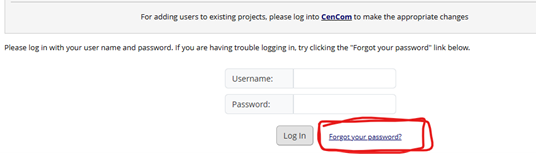
Please go to https://redcap.camide.cam.ac.uk/ and click on “Forgot your password?” in the bottom right-hand corner of the screen (as shown in the image below).
You’ll be prompted to enter your username, after which you'll receive a password reset email from helpdesk@ide-cam.org.uk.
If the email doesn't arrive, please contact the CAM:IDE helpdesk at helpdesk@camide.cam.ac.uk.
For anything not covered on this page, use the Contact Us button at the bottom right of the screen, or email helpdesk@camide.cam.ac.uk.
Last updated on 12/05/2026