Onboarding New Sites / IP Whitelisting
Please note: The guidance on this page applies only to REDCap Safe Haven. IP whitelisting is not required for access to REDCap Anonymised.
IP Whitelisting
Access to the REDCap Safe Haven is restricted by default. It is only available from external (public-facing) IP addresses that have been approved in advance (“whitelisted”).
We have already whitelisted the IP ranges for approximately 50 NHS Trusts, several UK Universities, and the Health and Social Care Network (HSCN), which many NHS Trusts use.
However, some Trusts route their internet traffic through their own local networks rather than through HSCN. If these IP addresses have not yet been whitelisted, staff at that Trust will not be able to access the Safe Haven.
Find out whether IP whitelisting is required
When onboarding a new site, the first thing to do is to check if their IP addresses are already “whitelisted” on the Safe Haven.
The easiest way to do this is to ask one of the users to try clicking the following link: https://redcap-camide.srcp.hpc.cam.ac.uk/.
The user should do this both on-site while connected to the site’s local network, and off-site or at home while connected to the site’s VPN.
They should see one of the two screens shown below.
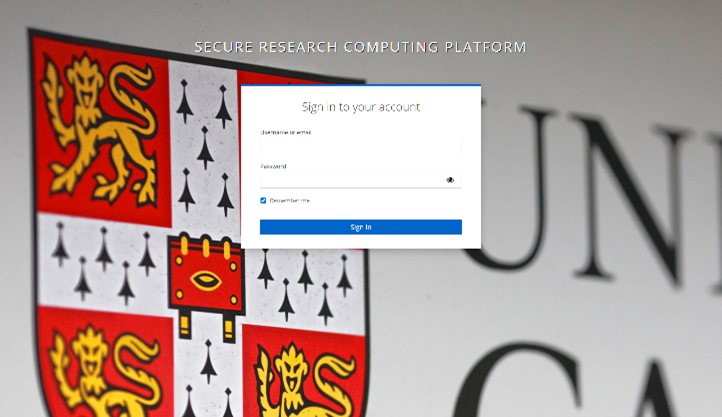
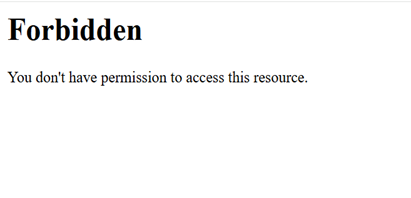
If they see the login screen (both on-site and off-site), this means the Trust's IP addresses have already been whitelisted, and no further action is needed.
If they see the “Forbidden” screen, please contact the Trust’s IT team and ask them to share the full list or range of IP addresses in use, so that CAM:IDE can arrange for them to be whitelisted.
The easiest way to do this is to ask a member of staff at the site to send the message below to their IT team. Once they receive the list, please forward it to helpdesk@camide.cam.ac.uk. The range of IP addresses will usually be whitelisted within five working days of receipt.
Template Messages
NHS Trusts
We are working with researchers at the University of Cambridge on a study called [study name]. Research data for this study is being collected using REDCap Safe Haven, a University of Cambridge–hosted REDCap installation used for the secure collection and management of research data, including personally identifiable information.
REDCap Safe Haven is hosted within the University of Cambridge Secure Research Environment, which is ISO 27001 certified and Data Security and Protection Toolkit compliant. Access to the environment is restricted by default and permitted only from approved networks. The University has already whitelisted the IP ranges for over 50 NHS Trusts, and access is also permitted via the Health and Social Care Network (208.127.192.0/21).
To allow outbound access from the Trust network to the REDCap Safe Haven platform (https://redcap-camide.srcp.hpc.cam.ac.uk / 128.232.227.232), the University of Cambridge needs to whitelist the Trust’s external/public IP address range(s).
Please could you provide the full range of external/public IP addresses in use at [Trust name], including any IPs used for VPN or remote access? This information will be shared with the University of Cambridge solely to enable outbound access. No inbound connections to the Trust network are required.
If further technical or information-governance detail is required to support this request, please contact the CAM:IDE at helpdesk@camide.cam.ac.uk.
Universities
We are working with researchers at the University of Cambridge on a study called [study name]. Research data for this study is being collected using REDCap Safe Haven, a University of Cambridge–hosted REDCap installation used for the secure collection and management of research data, including personally identifiable information.
REDCap Safe Haven is hosted within the University of Cambridge Secure Research Environment, which is ISO 27001 certified and Data Security and Protection Toolkit compliant. Access to the environment is restricted by default and permitted only from approved networks.
To allow outbound access from the University's network to the REDCap Safe Haven platform (https://redcap-camide.srcp.hpc.cam.ac.uk / 128.232.227.232), the University of Cambridge needs to whitelist the University's external/public IP address range(s).
Please could you provide the full range of external/public IP addresses in use at [site name], including any IPs used for VPN or remote access?
If further technical or information-governance detail is required to support this request, please contact the CAM:IDE at helpdesk@camide.cam.ac.uk.
Frequently Asked Questions
When should I check whether a site as access to REDCap Safe Haven?
Ideally, as soon as you know that staff at the site will need access to REDCap Safe Haven.
This helps avoid situations where multiple users have already been onboarded, only to discover they can’t log in because their network hasn’t been approved.
The site’s IT team is reluctant to share their IP addresses. What should I do?
Ask them to contact us directly at helpdesk@camide.cam.ac.uk. We can explain what’s needed and answer any questions they might have.
What is ISO/IEC 27001, and why does it matter?
ISO/IEC 27001 is an international standard for managing information security. It ensures that organisations have strict policies, processes, and controls in place to protect sensitive data. Our Safe Haven platform is certified to this standard, meaning we follow recognised best practices for keeping research data secure. Find out more about ISO/IEC 27001 here.
What is the NHS Data Security and Protection Toolkit?
The Data Security and Protection Toolkit is an online self-assessment tool that allows organisations to measure their performance against the National Data Guardian’s 10 data security standards. All organisations that have access to NHS patient data and systems must use this toolkit to provide assurance that they are practising good data security and that personal information is handled correctly.
For anything not covered on this page, use the Contact Us button at the bottom right of the screen, or email helpdesk@camide.cam.ac.uk.
Last updated on 31/03/2026